Autel Charge - EV Charging
- 3.3
- Rating
- 100.00K
- Installs
- Free
- Price

 Analysis by App-foxy
Managing an electric vehicle charger from a phone sounds simple, but the useful part is not the novelty of having an app. The real question is whether the app makes charging easier at the moment you need it. After spending time with Autel Charge, I found that its main value is giving Autel MaxiCharger owners a single place to interact with their home charging setup instead of treating the charger as a completely separate device.
This is a free Auto & Vehicles app from Autel New Energy Co., Ltd, aimed at people who already use compatible Autel charging equipment. It has an Everyone age rating and works on devices running Android 7.0 or later. The app was released on April 7, 2022, and the current version is 3.7.10. Those details matter because this is not a general-purpose EV companion that makes any charger smart; its usefulness depends heavily on whether your hardware belongs to the Autel MaxiCharger family.
My overall impression is practical rather than exciting. The application is most helpful when I want to check or manage charging without repeatedly walking over to the charger. It is less compelling for someone who only needs a basic plug-and-charge routine, or for an EV driver whose vehicle and charger already work well through another platform. The phone becomes a remote control and monitoring point, but it does not remove the need to understand the charger, the car, and the electrical installation.
You May Also Like

 Google Keep - Notes and lists
Google Keep’s Quiet Growth Shows the Appeal of Simpler Notes
As mobile work gets busier, Google Keep keeps winning a simple contest: capture a thought quickly, find it later, and get on with the day.

 Blood Strike: 2.5 Anniversary
Blood Strike’s Loadouts Turn Every Drop Into a Tactical Gamble
A close look at Blood Strike’s custom loadouts: how fast access to signature weapons reshapes its battle royale rhythm, rewards preparation, and narrows the gap between fights.

 Pandora - Music & Podcasts
Pandora’s Music Is Easy to Start, but Harder to Recover
Pandora’s strength is its low-effort path from a seed to a station. Its weak spot is how much confidence it asks you to place in connection, setup, and quiet recovery.

 8 Ball Pool
 Is Built on Rivalries, Rematches, and Routine
A close look at the rivalries, rematches, shared routines, and unanswered safety questions that turn a quick pool match into a persistent mobile community.

 Samsung Music
’s Quiet Strength Is Playing What You Already Own
Its reach comes less from spectacle than from dependable access to a personal library. That simplicity is both the app’s strongest retention engine and its ceiling.

 AccuWeather: Weather Radar
AccuWeather Review: A Quick, Clear Forecast for Everyday Decisions
For everyday plans, the best forecast is the one you can understand quickly. AccuWeather makes rain timing, radar, and local conditions easy to act on, with a few trade-offs.
More From Our News Desk



Why remote MaxiCharger control matters
I find remote MaxiCharger control most valuable when it helps me make a small decision without turning charging into a constant phone-checking task. In this section, I’ll look at how the connection shapes everyday use, including what I would do when the app and the physical charger seem out of step. That practical distinction leads naturally to the situations where using the app on the go is genuinely helpful.
The central capability is control from a phone
The store summary describes an easy way to control Autel MaxiCharger, and that is the right lens through which to judge the app. I would not install it simply because it belongs in the Auto & Vehicles category. I would install it because I want a more convenient relationship with a compatible home charger. The difference is small during an uneventful charging session, but it becomes noticeable when I need to check the charger from another room, decide whether a session is still active, or avoid interrupting the car unnecessarily.
That remote-control idea changes the charger from a fixed object on a wall into something I can include in my normal evening routine. Instead of treating charging as a task that begins and ends at the parking space, I can use the app as the place where I check the state of the setup and make a decision. This is particularly useful when the car is outside, when the charger is in a shared garage, or when I am trying to avoid disturbing a vehicle that is already connected.
The strongest benefit is convenience between the car and the charger, not a replacement for either one. The app does not make an incompatible charger compatible, and it does not turn every EV into a fully automated system. Its job is narrower and, for the right owner, genuinely useful: it gives MaxiCharger users a software layer for handling charging from a phone.
What I would check before relying on it
The first practical question is compatibility. If I were helping a friend set this up, I would begin with the exact Autel charger model and the way it is installed, rather than downloading the app and assuming every charging product will appear automatically. The app is built around Autel MaxiCharger control, so ownership of unrelated home charging equipment is a clear reason to look elsewhere.
I would also make sure the phone is supported before planning a charging routine around it. The minimum Android requirement is 7.0, which covers many older devices, but an old operating system can still create a poor experience if the phone has connection or notification problems. The app is free, so trying it does not add a purchase cost, but the surrounding hardware remains the important investment.
Another sensible step is to keep the physical charger and the car controls in mind. A phone app is convenient, but it should not be the only way I understand what is happening. If the phone is unavailable, the charger and vehicle still need to be usable in their ordinary way. I see the app as an extra control surface, not as permission to ignore the basic indicators and instructions that come with the charging equipment.
How the app fits into an ordinary charging session
A realistic evening looks like this: I arrive home, connect the vehicle, and then move on to cooking or working. With the app installed and the MaxiCharger set up, I can use my phone as the point of reference rather than returning to the driveway every time I want reassurance. That saves more effort than the individual taps suggest, especially when the charging area is not directly visible from the house.
The useful habit is to check the app at decision points instead of constantly watching it. I might look after connecting the cable, check again before going to bed, and use the charger itself when I am physically next to the car. That approach keeps the app helpful without turning charging into another screen-based chore. In my experience, remote control works best when it reduces interruptions rather than encouraging constant supervision.
For a shared household, the value can be slightly different. One person may connect the car while another wants to know whether charging is still underway. A central app can make that handoff easier than relying on memory or asking someone to inspect the charger. Still, I would avoid assuming that every household member should change settings. A simple agreed routine is safer: one person manages the charging setup, while others use the app mainly for awareness.
Using it as a decision tool, not just a remote button
The less obvious advantage of a charger app is that it can help me decide when action is actually necessary. If the vehicle is connected and the session appears normal, there is no reason to keep going outside. If something needs attention, the app gives me a reason to investigate instead of discovering the issue much later. That distinction is important for people who park away from the house or have limited visibility of the charging point.
I would also use the app to create a personal charging checklist. Before leaving the car overnight, I would confirm the cable connection at the vehicle, check the charger, and then use the phone as a final reference. This is not a glamorous feature, but it reduces the common mistake of assuming that plugging in automatically means everything is progressing as expected.
There is a trade-off here. Remote access can create confidence, but it can also make me overconfident. A phone screen cannot physically inspect a loose connector, a damaged cable, or an installation problem. If the car or charger shows a warning, I would treat that as a reason to stop and investigate rather than repeatedly refreshing the app.
The best scenario: overnight charging at home
The clearest use case is a driver who charges at home after returning from work. The car is parked in a garage or on a driveway, the MaxiCharger is already installed, and the driver wants to avoid making repeated trips outside. In that setting, the app turns a routine physical check into a quick phone check. The benefit is not faster charging by itself; it is less friction around the charging process.
It is especially helpful when the car is connected late in the evening. I can make charging part of the bedtime routine without needing to stand beside the vehicle. If I wake up wondering whether the car is ready, the app provides a convenient place to check before I put on shoes and go outside. That is a small improvement, but it is exactly the kind of improvement that makes connected hardware feel worthwhile.
Another strong scenario is a charger located at the far end of a property. A detached garage, a parking area behind a building, or a shared residential space can make physical checks annoying. In those situations, the app's remote role has a clearer payoff than it does for someone who can see the charger from the kitchen window.
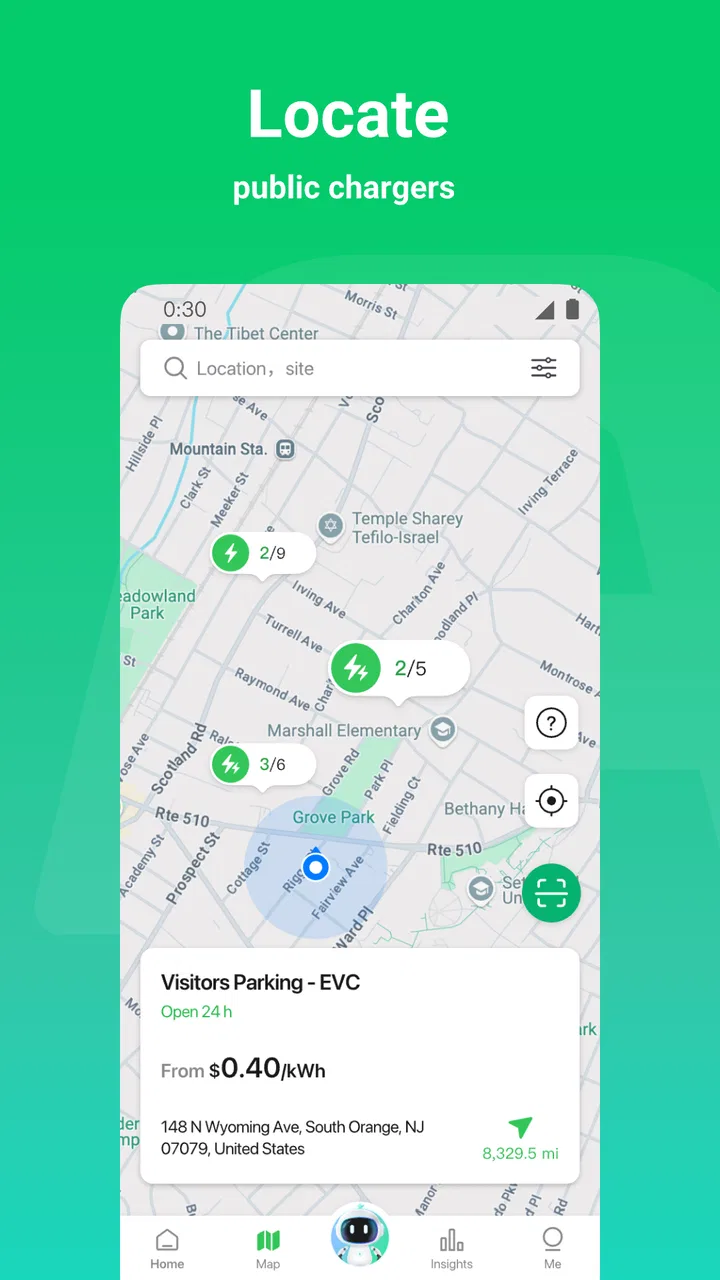
I would be more cautious about presenting it as the answer for public charging. The app is centered on Autel MaxiCharger control, so its natural home is an Autel charging setup rather than every charging station a driver may encounter. For public charging, the vehicle manufacturer's app, the station operator's system, or a broader charging service may be more relevant depending on where the driver charges.
Where the experience can feel less smooth
The main limitation is that the app adds another layer to an already multi-part process. There is the vehicle, the charging cable, the MaxiCharger, the phone, and the connection between them. When everything works, that layer is convenient. When something does not work, it can be harder to know whether the issue belongs to the car, the charger, the phone, or the connection between them.
That is why I would not recommend making the app the sole source of truth. I would use it alongside the charger’s physical indicators and the vehicle’s own charging information. If the app and the car appear to disagree, I would check the physical connection and the vehicle before assuming that a refresh or repeated command will solve the problem.
The app also has limited appeal for drivers who want a broad, brand-neutral dashboard. Someone with different charger brands, frequent public charging needs, or a preference for managing everything through the car manufacturer's application may find Autel Charge too focused. Its specialization is a strength for MaxiCharger owners, but it is also the reason it is not an obvious recommendation for every EV driver.
Ratings reflect a mixed but usable reception: the app holds a 3.4 average from around 1.4 thousand ratings, with 127 written reviews. I would read that as a reminder to keep expectations realistic. A connected charging app can be valuable without being flawless, and small problems become more noticeable when the app is involved in a task people expect to be dependable.
Three habits that make it more useful
First, I would avoid checking it continuously. A few deliberate checks are more useful than treating the app like a live dashboard. This preserves the convenience of remote monitoring while reducing the temptation to react to every small delay or status change.
Second, I would keep the app's role clear within the household. If several people use the same charger, agreeing on who changes charging settings can prevent accidental interruptions. Everyone can benefit from visibility, but control should be handled thoughtfully, especially when one vehicle needs to be ready at a particular time.
Third, I would test the complete routine before depending on it for an important trip. Connect the car, inspect the charger, check the app, and then confirm the vehicle's own charging indication. Doing this when there is no urgency helps reveal connection or setup issues while there is still time to solve them.
A fourth habit is worth adding: when the app shows an unexpected state, do not immediately repeat commands. I would first look at the cable, the car, and the charger. Repeatedly sending actions from a phone can make the situation less clear. A calm physical check is often more useful than assuming the software view explains every detail.
Who benefits most from Autel Charge?
The best match is an Autel MaxiCharger owner who wants everyday convenience and prefers managing charging from a phone. The app makes the most sense for home charging, especially when the charger is not close to the living space or when the driver wants a simple way to check the session without returning to the vehicle.
It is also a reasonable choice for households where more than one person needs awareness of the charging routine. The app can make the charger easier to include in normal planning, although I would still keep the physical charger and vehicle controls familiar to everyone who may need them.
I would suggest skipping it if the charger is not an Autel MaxiCharger, if charging is almost always public, or if the vehicle manufacturer's app already provides everything the driver needs. In those cases, adding a separate control app may create more accounts, screens, and troubleshooting steps without delivering a meaningful improvement.
My final view after using it
Autel Charge is a focused tool rather than a universal EV command center. Its purpose is easy to understand: give Autel MaxiCharger users a convenient way to interact with their charging setup from a phone. That focus keeps the recommendation simple. If I owned compatible Autel hardware and wanted fewer trips to the charger, I would try it because the free download makes the experiment low-risk.
I would not choose it solely because it is popular. The app has over 100 thousand installs, but that figure does not change the compatibility question or guarantee that it will fit every charging routine. What matters is whether remote MaxiCharger control solves a real inconvenience in my home.
For me, its strongest effect is modest but practical: it turns charging from something I must repeatedly inspect into something I can check as part of my normal day. The trade-off is that it introduces another software layer and should not replace physical checks or the vehicle's own information. If that balance suits you, Autel Charge can make home charging feel more manageable. If you need a brand-neutral charging hub, a public-charging companion, or a completely hands-off system, a different app will likely be the better choice.
FAQs for Autel Charge - EV Charging
01What is Autel Charge and how does it work?
Autel Charge is an app designed to facilitate electric vehicle (EV) charging. It allows users to locate nearby charging stations, start and stop charging sessions, and monitor the progress of their vehicle's charge. The app provides real-time data and integrates with various payment methods to ensure a seamless charging experience.
02Is Autel Charge compatible with all electric vehicles?
Autel Charge is compatible with a wide range of electric vehicles. However, users should verify the compatibility of their specific EV model with the charging stations available in the app. The app supports common charging standards, making it suitable for most modern EVs, but checking specific compatibility is advised.
03How do I find charging stations using Autel Charge?
Autel Charge provides an intuitive map interface that displays nearby charging stations. Users can filter results based on charging speed, connector type, and availability. The app also offers detailed information about each station, including user reviews and operational status, ensuring you can find the most convenient option.
04Does Autel Charge require a subscription or any additional fees?
Autel Charge itself is free to download and use. However, charging stations may have varying fees, which are determined by the station operators. The app provides transparent pricing information before you start a charging session, so you’ll know what to expect in terms of costs.
05What security measures does Autel Charge implement to protect user data?
Autel Charge employs robust security protocols to safeguard user data, including encryption and secure payment processing. The app requires account authentication and offers privacy settings that allow users to control the information they share. Continuous updates ensure compliance with the latest security standards.
Pros
- User-friendly interface for easy navigation.
- Real-time charging station availability updates.
- Supports multiple payment options.
- Detailed charging history and reports.
- Customizable notifications for charging status.
Cons
- Limited station coverage in rural areas.
- Occasional app crashes on older devices.
- Requires account creation for full features.
- In-app ads can be intrusive at times.
- Some features locked behind a paywall.

Autel Charge - EV Charging
Gallery